
- Which rules should you follow ?
- Choosing the right tasks
- Uncluttering your TMS
TMS Ground rules
There are simple rules to follow if you want to make the most out of using a Task Management System.
First of all, you need it to be quickly available
Like most of the tools you might want to use and put in place, the most important thing is to remove any friction from using them. The easier they are to start to use, the more useful these tools become and more importantly, the more likely you will be to use them.
Additionally, by having a quick access to your TMS, you’ll be able to keep your mind focused on the work or discussion you are having instead of focusing on reminding yourself of the task you’ll need to do later on.
Lastly, when your TMS is ready at any point in time you can more easily get to the next task with ease. It just means being more efficient on your task switching, really 🙂
Second you need it to feel simple
Continuing the idea of bringing the friction level down, the tool you set up and use must definitely feel simple. The key word here is feel. You might have to come up with a complex structure to keep your life and work organized or separate tasks by projects or clients. The way you structure your tasks doesn’t need to be simple at its core or to the outside eye, but for YOU it needs to make sense and to feel simple.
Add all the complexity you need, but streamline the process needed to add task in the right section as much as possible.
Lastly you need it to be persistent
One thing you need for your TMS set up is trust. You need to be sure that the tasks you have to do are in the system and that they won’t leave for any reason unless you want them to.
Most people start their TMS systems with either post-it notes, a blank sheet of paper or a notepad. For a lot of reasons, this first choice is good, these are easy to use physical objects people can use. However, when it comes to persistence, these tools are on the lower end of it. Post-it notes are mostly stuck to your screen or desk/wall, blank sheets of paper are loose and can get trashed easily and notepads aren’t searchable in the long run.
Persistence of your tools over time and in your physical space allows you to transform your system into a very powerful tool. You’ll be able to both trust the tool you are using over time and also rely on it at any given time. You’ll want to make sure this tool is always with you and can handle the stress of time.
Choosing the right tasks
With any tool you set up or use, the one thing that can go wrong is how you use it. Therefore, like any tool, you first need to make sure that you know how to use it properly.
The primary pitfall with any task management system is to add too many tasks that will just overwhelm you when trying to figure out what to start with or to do.
Here are some simple rules to make sure you use the right tasks at the right time:
Start with the difficult tasks and the boring tasks first.
Why start with the difficult tasks : the difficult tasks will most probably need most of your brain power and your attention. Therefore these should be the first one to choose when selecting the tasks you need to focus on.
After the difficult tasks, the best is to focus your attention based on the following methods.
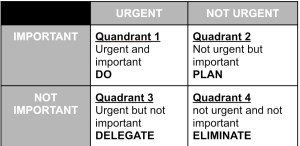
Eisenhower Matrix
This matrix allows to structure your decision making into 4 quadrants. Each quadrant gives you a clear view of when and if you should take a task into your todo list:
2 minute rule
The two minute rule is simple really, whenever a task takes 2 minutes or less, you should do it straight away. This will unclutter your mind and allow you to focus on the rest of the Eisenhower matrix.
Boring task first
As long as the task fall into one of the Eisenhower matrix fields you will target (quadrant 1) and is boring, you should follow with that one first.
Uncluttering your TMS
One last step to get the most out of your system is to make it last as long as possible. There is nothing worse than a system you work on but end up quitting because it’s a mess. Therefore, you need to learn to unclutter your TMS. Here are some simple rules to follow:
- Create an inbox / task dump location in your TMS. You are not going to be able to work on all tasks at once and new tasks shouldn’t take space in your current tasks.
- Choose a limited number of tasks from your task inbox every day / half day to work on following the steps mentioned in the previous segment.
- Remove all untouched tasks or use an automatic removal for tasks you haven’t done that day from your current tasks. This will help you plan the next day more easily
- Repeat
Following the above steps will definitely help you make the most out of any Task management system you build for yourself.

 Mr Merv